
Create/Update Customer Contact API
Purpose
This API creates or updates Sidetalk customer contacts using information collected by external service signup, reservation, or inquiry forms.
If the same memberId exists, it updates the existing customer. Otherwise, it creates a new customer.
URL
JavaScript
💡https://api.sidetalk.ai/v1/usersHTTP method
POST
Headers
| Headers | Value | Description |
|---|---|---|
| Content-Type | application/json | Indicates that the request body is JSON. |
| Authorization | Bearer <api_key> | Use the API key provided in Install in the Sidetalk dashboard. |
Body
| Parameter | Type | Required | Description |
|---|---|---|---|
| userInfoId | Number/String | Conditionally required | The Sidetalk customer information ID, used to update an existing contact directly. |
| memberId | String | Conditionally required | The external service’s unique member ID. If the same memberId exists, the existing contact is updated. |
| sessionId | String | Conditionally required | The chat session ID, used to create/update contacts for non-member chat sessions. |
| userName | String | No | The customer’s name, saved as userName in Sidetalk customer information. |
| userEmail | String | No | The customer’s email, saved as userEmail in Sidetalk customer information. |
| userPhone | String | No | The customer’s phone number, saved as userPhone in Sidetalk customer information. |
| customerMemory | String | No | Customer notes. |
| extraFields | Object | No | Additional customer fields. Keys must match field keys in the dashboard’s Customer Information Settings. |
| customerAlias | String | No | A customer alias managed separately from userName. If omitted, the existing alias is retained. |
At least one of userInfoId, memberId, or sessionId is required.
How to use extraFields
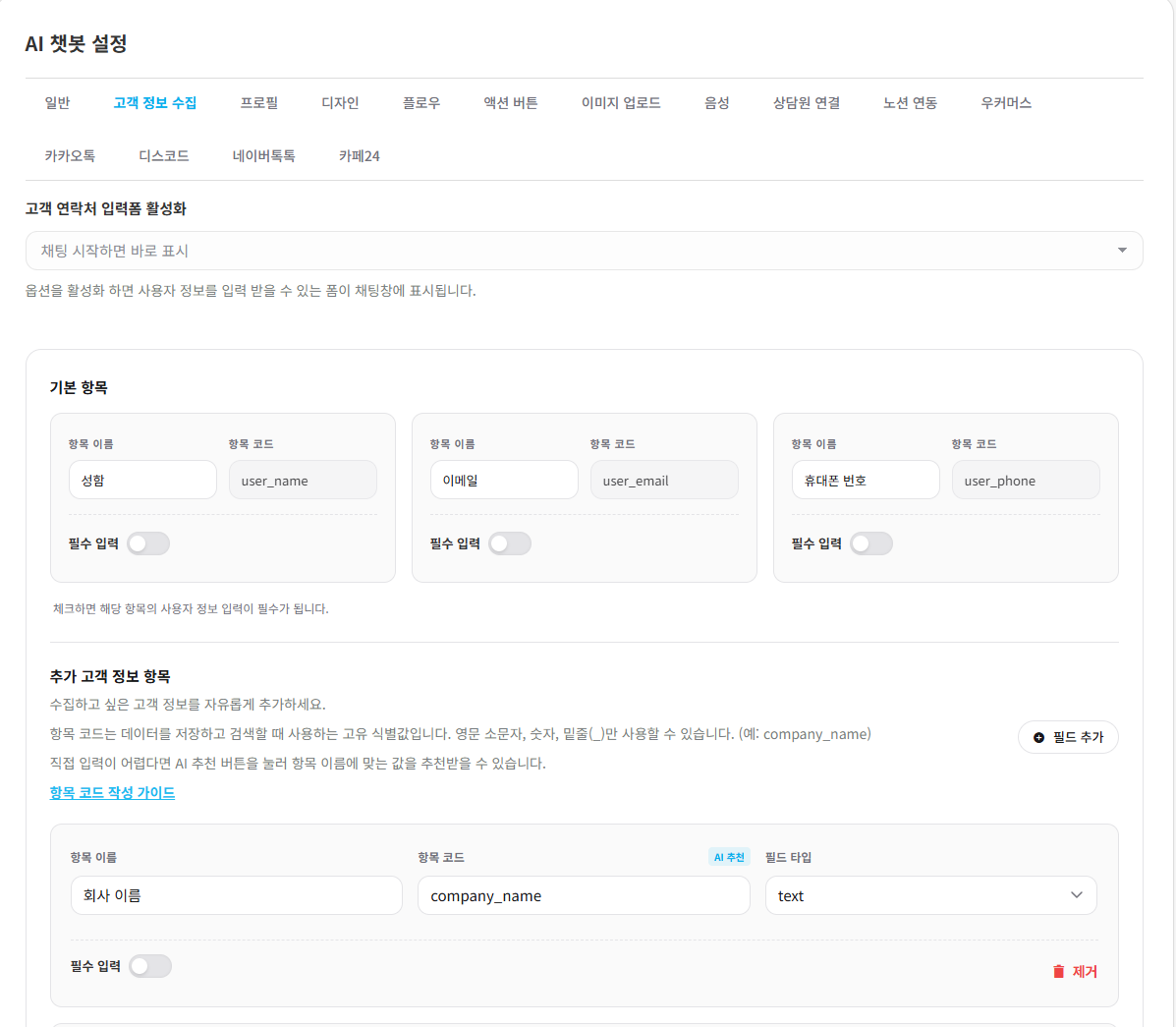
For additional fields created in Sidetalk Customer Information Settings, use each field key as the key in extraFields.
For example, if Customer Information Settings contains these fields:
| Field name | Field key |
|---|---|
| Company name | company_name |
Send the request body as follows.
JavaScript
{
  "extraFields": {
    "company_name": "코스모스팜"
  }
}
Example request
Create/update a member customer
Creates or updates customer contacts by memberId.
Use for signup, synchronization of signed-in members, or external service member integration.
JavaScript
curl -X POST https://api.sidetalk.ai/v1/users \
  -H "Content-Type: application/json" \
  -H "Authorization: Bearer ${API_KEY}" \
  -d '{
      "memberId": "user_123",
      "userName": "홍길동",
      "userEmail": "hong@example.com",
      "customerAlias": "VIP 고객",
      "userPhone": "01012345678",
      "customerMemory": "VIP 고객",
      "extraFields": {
          "company_name": "코스모스팜"
      }
  }'
Create/update a non-member customer
Creates or updates contacts based on sessionId.
Use for customers without member IDs, such as chat sessions, guest reservations, or guest inquiry forms.
JavaScript
curl -X POST https://api.sidetalk.ai/v1/users \
-H "Content-Type: application/json" \
-H "Authorization: Bearer ${API_KEY}" \
-d '{
		"sessionId": "chat_session_abc123",
		"userName": "홍길동",
		"customerAlias": "VIP 고객",
		"userEmail": "hong@example.com",
		"userPhone": "01012345678",
		"customerMemory": "VIP 고객",
		"extraFields": {
		"company_name": "코스모스팜"
	}
}'
Directly update an existing customer contact
If you know the Sidetalk customer information ID, update directly using userInfoId.
JavaScript
curl -X POST https://api.sidetalk.ai/v1/users \
  -H "Content-Type: application/json" \
  -H "Authorization: Bearer ${API_KEY}" \
  -d '{
      "userInfoId": 123,
      "userName": "홍길동",
      "customerMemory": "상담 후 VIP 고객으로 변경"
  }'
Response body
JavaScript
{
  "success": true,
  "data": {
    "siteId": 1,
    "userInfoId": 123,
    "sessionId": "",
    "memberId": "user_123",
    "userName": "홍길동",
    "customerAlias": "VIP 고객",
    "userEmail": "hong@example.com",
    "userPhone": "821012345678",
    "userPhoneCountryCode": "82",
    "customerMemory": "{\"_sidetalk_customer_profile\":\"1\",\"memo\":\"VIP 고객\",\"extra_fields\":{\"company_name\":\"코스모스팜\"}}",
    "isManual": "1",
    "createdAt": "20260527143000",
    "updatedAt": "20260527143000"
  }
}
- userPhone may be normalized to digits when saved. Example: 01012345678 → 821012345678
- userPhoneCountryCode may also be saved. Example: 82
Response fields
| Field | Type | Description |
|---|---|---|
| success | Boolean | Whether the request succeeded. |
| data | Object | The saved customer information. |
| data.userInfoId | Number | The Sidetalk customer information ID. |
| data.memberId | String | The requested external member ID. |
| data.sessionId | String | The linked chat session ID. |
| data.userName | String | The saved customer name. |
| data.userEmail | String | The saved customer email. |
| data.userPhone | String | The saved customer phone number. |
| data.customerMemory | String | Customer notes and additional field data. |
| data.userPhoneCountryCode | String | The saved phone country code. |
| data.isManual | String | Whether it was entered directly: 1 or 0. |
| data.createdAt | String | Creation date and time. |
| data.updatedAt | String | Modification date and time. |
Error response
JavaScript
{
  "success": false,
  "error": "userInfoId, memberId, or sessionId is required."
}
JavaScript
{
  "success": false,
  "error": "At least one customer field is required."
}
JavaScript
{
  "success": false,
  "error": "Name must be at least 2 characters."
}
JavaScript
{
  "success": false,
  "error": "Invalid phone format."
}| Field | Type | Description |
|---|---|---|
| success | Boolean | Whether the request failed. |
| error | String | The error message. |
Example image
Notes
- Sending memberId and sessionId together can link CRM activities from a guest chat session to the memberId customer contact.
- Contacts saved through this API are used as the customer reference for CRM activity history.
- Contacts saved by an external API show an External API Integration history in Customer Contacts.
- If the same userInfoId exists, updates that contact directly.
- If the same sessionId exists, creates or updates the contact for that guest session.
- The following aliases are also supported for backward compatibility and easier external integration.
- customerAlias is stored separately from userName.
- If customerAlias is omitted, the existing alias is unchanged.
| Primary field | Supported aliases |
|---|---|
| userInfoId | user_info_id, id |
| memberId | member_id, wpUserId, wp_user_id, userId, user_id |
| sessionId | session_id |
| userName | user_name |
| userEmail | user_email |
| userPhone | user_phone |
| userPhoneCountryCode | user_phone_country_code |
| customerMemory | customer_memory |
| extraFields | extra_fields |
| isManual | is_manual |
| customerAlias | customer_alias |